
Anatomy of a “Professional” Trading Desk Setup vs. Reality
Anatomy of a “Professional” Trading Desk Setup vs. Reality
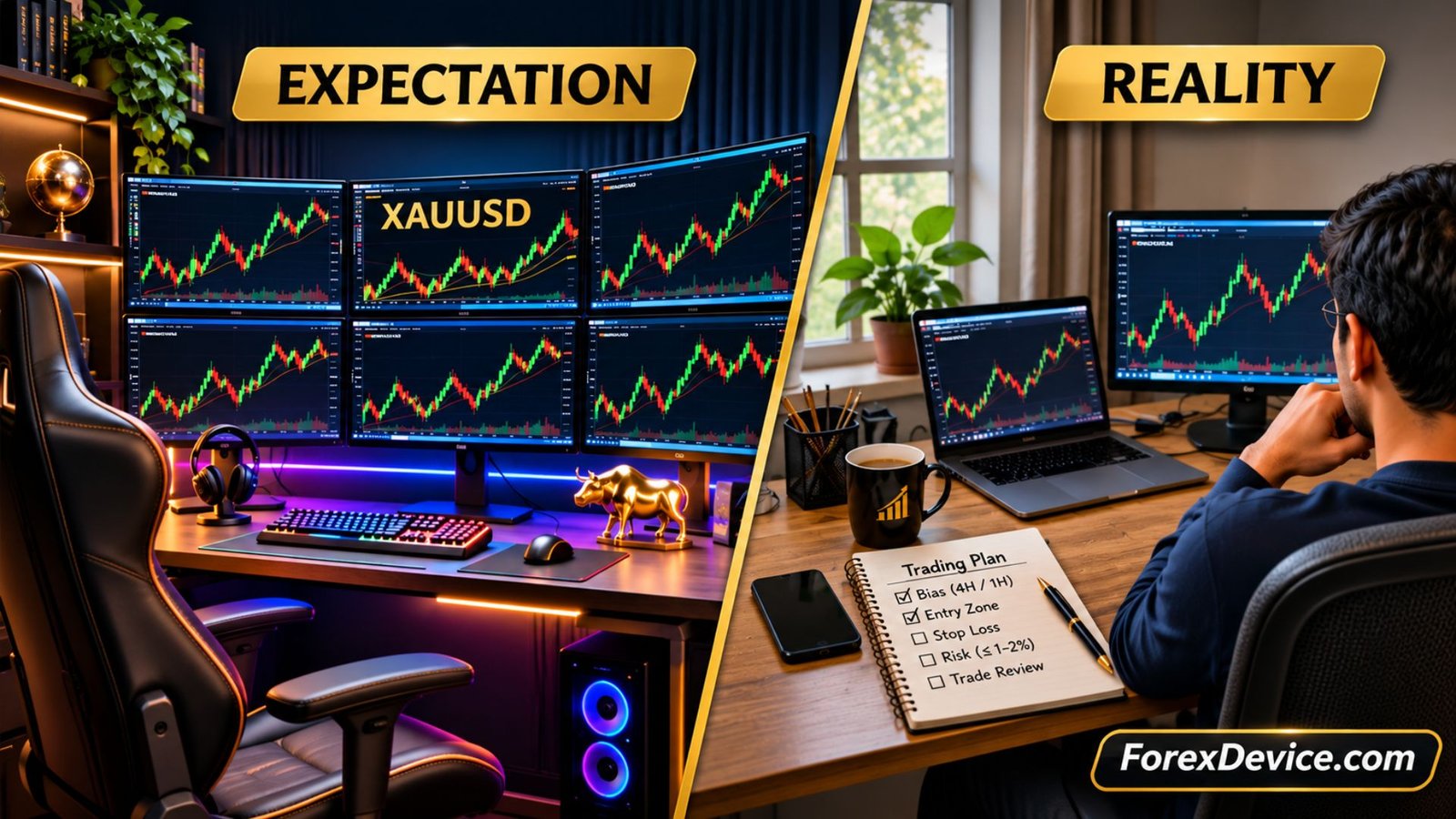
Six monitors. A glowing keyboard. Three market calendars. A coffee mug that says “Buy the Dip.” Somewhere in the background, a dramatic candlestick chart is moving as though it knows the camera is watching.
That is the internet’s version of a professional trading desk. The reality is usually less cinematic: one or two screens, a carefully prepared trading plan, a few unanswered questions, and a trader trying very hard not to turn a normal market pullback into a personal emergency. For XAUUSD traders, the difference between looking professional and working professionally is worth understanding.
The Trading Desk Fantasy: Where Every Monitor Looks Profitable
Trading desk photographs have become a genre of their own. There is the six-screen command centre, the panoramic city view, the RGB lighting that appears capable of illuminating a small airport, and the obligatory chart covered in colorful indicators.
Everything looks remarkably organized. Every chart seems to be trending. The trader is calm, the desk is spotless, and nobody has accidentally opened the wrong symbol or forgotten why a position was entered.
What the photograph cannot show is whether the trader follows a plan, sizes positions sensibly, understands execution costs, or reviews mistakes.
The trading desk paradox: The more impressive a workstation looks in a photograph, the easier it is to forget that its most important component is the decision-making process taking place in front of it.
A trader can display twenty indicators and still have no clear answer to a basic question: “What specific condition would make me abandon this trade idea?”
Meanwhile, another trader may use an ordinary laptop, a notebook, and a simple chart layout while maintaining a far more disciplined routine. Neither setup guarantees results, but only one of them clearly prioritizes decisions over decoration.
What a Professional Trading Desk Actually Needs
A useful trading desk should help a trader complete four tasks: understand market conditions, make decisions, execute orders, and review outcomes. Every tool should support at least one of these activities.
A dependable trading platform
For an XAUUSD trader, a properly configured MetaTrader terminal or another suitable platform matters more than the number of monitors connected to it.
The trader needs to understand the broker’s contract specifications, spread, commission structure, trading hours, margin requirements, and order execution behavior. These details can affect an actual trade even when the chart pattern looks perfect.
A clear market context
A professional setup separates the bigger market picture from the immediate entry decision. For example, a trader might study the four-hour trend, identify an important hourly price zone, and then examine the fifteen-minute chart for a possible setup.
The purpose is not to make every timeframe agree. It is to understand when they disagree and decide whether the trade still meets the plan.
Visible risk controls
Position size, stop-loss distance, available margin, and maximum acceptable loss deserve more attention than animated profit counters.
Before placing a trade, a trader should know what could invalidate the setup and how much the position might lose under the planned stop, while recognizing that slippage or unusual conditions can change the actual result.
A place to record decisions
A trading journal does not need to be expensive software. A spreadsheet or notebook can record the trade thesis, planned entry, stop, outcome, and whether the rules were followed.
That information turns the trading desk from a collection of screens into a learning environment.
A Practical XAUUSD Screen Layout Without Six Monitors
Gold traders can benefit from monitoring several timeframes, but more charts do not automatically provide more insight. A focused layout can often communicate the same essential information with fewer distractions.
| Workspace area | What to display | Why it matters |
|---|---|---|
| Market context | XAUUSD 4H chart | Shows broader structure and important price regions |
| Planning | XAUUSD 1H chart | Helps refine support, resistance, and possible scenarios |
| Execution | XAUUSD 15M chart | Supports entry timing and setup validation |
| Risk and orders | Positions, pending orders, account metrics | Keeps exposure and execution visible |
| Reference | Calendar, checklist, trading journal | Provides context without overcrowding the charts |
On a single monitor, the trader can switch between chart tabs and keep the trading terminal’s order panel accessible. With two monitors, one can display the chart workspace while the other holds the calendar, journal, and risk checklist.
There is no requirement to display every timeframe simultaneously. If switching tabs takes two seconds and prevents constant distraction, that may be a perfectly reasonable compromise.
Practical example: Suppose XAUUSD is approaching a resistance region on the hourly chart. Instead of adding four more indicators, the trader can mark the region, inspect the broader four-hour structure, and wait for a predefined fifteen-minute response. If the planned confirmation does not appear, the desk has still done its job by helping the trader avoid an unplanned entry.
The goal is an uncluttered view of the decision, not a competition to display the greatest number of candlesticks.
Expensive Trading Equipment vs. Equipment That Actually Helps
There is nothing wrong with enjoying high-quality equipment. A comfortable chair, sharp monitor, and reliable computer can improve the working experience. The mistake is treating expensive hardware as evidence of trading skill.
| The impressive purchase | The practical question |
|---|---|
| Six ultra-wide monitors | Do you genuinely need more simultaneous information? |
| Premium gaming computer | Does your trading software require that level of performance? |
| Elaborate RGB lighting | Does it improve visibility or simply look attractive? |
| Multiple premium data subscriptions | Does each source contribute something distinct? |
| Expensive ergonomic chair | Does it improve comfort during long working sessions? |
| Backup internet or power | Could it reduce interruptions during critical operations? |
The chair and backup connectivity may have a more direct practical benefit than another screen filled with redundant charts.
For traders running automated systems, the priorities are slightly different. Platform stability, appropriate hosting, connectivity, correct settings, and monitoring procedures can matter more than the appearance of the local workstation.
A virtual private server, or VPS, is a remotely hosted computer that can keep a trading terminal running independently of the trader’s home computer. It can help with continuity, but it does not eliminate broker outages, software faults, or execution risks.
Technology should support a trading process, not create the illusion that the process has already been solved.
Expectation vs. Reality: One Ordinary Gold Trading Session
Imagine two versions of the same trader preparing for a London-session XAUUSD setup.
The social media version
At the opening bell, the trader adjusts six screens, checks a dozen indicators, and announces that gold is about to make a major move. A dramatic soundtrack begins. One perfectly timed entry appears, followed by a satisfying screenshot.
The video ends before the viewer discovers whether the position was managed properly, whether the setup was repeatable, or how many other trades were taken that day.
The real-world version
The trader opens the terminal and notices that gold has already moved significantly. The first decision is not where to buy or sell, but whether the original opportunity still exists.
The hourly chart shows a nearby price zone. The fifteen-minute chart is moving rapidly, but the trader’s entry condition has not appeared. A scheduled economic release is approaching, so the trader checks whether the plan permits trading around that event.
Ten minutes pass. Nothing qualifies. The trader drinks coffee.
Another fifteen minutes pass. The market briefly moves in the anticipated direction, then reverses. The trader still has no position.
Finally, a setup appears. The trader calculates the planned risk, checks the spread, confirms the order details, and executes only if the conditions are satisfied.
The position may win, lose, or be closed according to the plan. Afterward, the trader records what happened.
The unglamorous truth: A well-managed session may contain no trades at all. Avoiding an unsuitable entry can be a valid outcome, even though it produces a terrible thumbnail for social media.
Real trading contains waiting, uncertainty, interruptions, and imperfect information. A professional routine is designed to operate under those conditions rather than pretend they do not exist.
Five Mistakes Hidden Behind Beautiful Trading Setups
1. Confusing activity with productivity
Opening more charts, changing indicators, and refreshing market commentary can create the feeling of hard work. Yet none of those actions necessarily improves a trading decision. A useful question is whether each activity changes the plan or merely fills time.
2. Watching too many correlated markets
A gold trader might monitor the US dollar, bond yields, equity indices, and several currency pairs. These markets can provide context, but correlations are not fixed instructions. Treating every movement elsewhere as a signal to trade gold can create contradictory interpretations.
3. Letting alerts become orders
An alert is information, not permission to execute. It should prompt the trader to check predefined conditions. Otherwise, a workstation with dozens of alerts may simply become a machine that interrupts its owner.
4. Buying tools instead of testing a process
A new monitor cannot repair an undefined entry rule. An expensive indicator cannot replace position sizing. A faster computer cannot make a weak strategy reliable.
Before buying additional equipment, identify the actual bottleneck. Is the problem slow execution, poor visibility, missed information, or inconsistent decisions? The answer determines whether a purchase is useful.
5. Copying the trader instead of examining the method
Online trading personalities often display impressive workstations and confident commentary. Viewers should distinguish presentation from evidence.
Financial regulators have warned that social media investment information can be misleading, and that appearances or testimonials should not replace independent verification. An attractive desk photograph establishes very little about the reliability of the person operating it.
How to Build a Better Trading Desk Without Overspending
Start with the work you need to perform, then choose equipment that supports it. This order is less exciting than buying a monitor first, but considerably more logical.
Step 1: Define your trading workflow
Write down what you check before a session, what triggers an entry, how you determine risk, and what you review afterward. If the workflow is unclear on paper, adding screens will probably make it more complicated.
Step 2: Create three working areas
Separate the workspace into analysis, execution, and review. These can be three windows on one computer rather than three physical monitors.
Keep the execution area particularly simple. Order type, symbol, volume, stop-loss, and current exposure should be easy to verify before submitting an instruction.
Step 3: Remove duplicate information
If four indicators all communicate roughly the same momentum condition, decide whether each adds useful information. Similarly, avoid keeping several news feeds open when one reliable source covers the events you actually monitor.
Step 4: Prepare for interruptions
Know how to access your account if the main computer fails. Understand the broker’s alternative order-management options, where available, and keep essential account-support information accessible through secure methods.
Do not leave passwords in plain sight or publish screenshots containing account credentials, personal information, or sensitive trading details.
Step 5: Review the desk after two weeks
Track what genuinely helped. Did the second monitor prevent mistakes? Did a new alert save time? Did a calendar reduce surprise exposure around scheduled events?
Remove tools that consume attention without contributing useful information. A good workstation evolves around observed needs rather than imagined professional appearances.
Simple desk checklist
- Reliable trading terminal and internet connection
- Clear charts with readable price levels
- Accessible order and exposure information
- Written entry, exit, and risk rules
- Relevant market calendar
- Secure backup access and recovery procedure
- Trading journal and scheduled review time
The Professionalism Reality Check
There is a useful distinction between a professional-looking desk and a professionally operated one.
The first is judged by appearance. The second is judged by the quality and consistency of its operating process.
A serious XAUUSD trader should be able to explain why a chart is open, what information matters, when an entry is permitted, how exposure is controlled, and what happens if the trade idea fails.
These questions apply equally to discretionary traders and people using automated trading systems. Automation may execute predefined rules, but the operator still needs to understand the strategy, settings, broker environment, and circumstances in which intervention or review may be necessary.
Ultimately, the best trading desk is not necessarily the most expensive, the most photogenic, or the one with the greatest number of flashing lights.
It is the desk that helps its owner think clearly, act deliberately, and learn from actual decisions.
And if it happens to have attractive lighting, a comfortable chair, and a coffee mug shaped like a gold bar? There is no rule against enjoying the scenery.
Frequently Asked Questions
How many monitors do I need for forex or gold trading?
One monitor can be sufficient for a focused trading workflow. A second may help separate charts from order management or research. Additional screens should solve a specific practical need rather than serve as a measure of professionalism.
Is a gaming PC necessary for MetaTrader trading?
Not usually for ordinary chart analysis and basic terminal operation. Requirements depend on the number of terminals, indicators, automated strategies, and other applications running simultaneously. Stability and sufficient resources matter more than gaming-oriented specifications.
Can I trade XAUUSD professionally from a laptop?
A laptop can support chart analysis, order management, journaling, and other trading tasks. What matters is the suitability of the hardware, connectivity, platform configuration, and trading process. Equipment alone does not determine whether trading is profitable or professional.
Should I use a VPS for an automated trading system?
A VPS can be useful when a trading terminal needs to operate continuously without depending on a home computer. Its suitability depends on the software, broker connectivity, monitoring requirements, and available resources. It is an operational tool, not a guarantee against downtime or trading losses.
What is the most important item on a trading desk?
A documented decision-making and risk-management process is more important than any single piece of equipment. Charts, terminals, calendars, and journals become useful when they support that process.
Sources & Further Reading
- CFTC — Eight Things You Should Know Before Trading Forex: Broker due diligence, platform considerations, leverage, and trading risks.
- FINRA — Frequent Intraday Trading: Understanding the Basics: Trading costs, margin considerations, and the demands of frequent trading in securities markets.
- Investor.gov — Social Media and Stock Tip Scams: Why attractive online trading claims and social media recommendations deserve independent scrutiny.