
GoldPulse PRO
Parameters
A practical reference for the key controls available inside the GoldPulse PRO Expert Advisor. Understand each setting, see how they interact with the underlying trading engine, and review the current v1.04 configuration shown in the EA settings reference.
Configuration overview
Use the v1.04 settings image below as the visual reference for the supplied EA build. Review each value in your own MT4 or MT5 Inputs tab before activation.
The settings screenshot is from the MT4 v1.04 build. Check the MT5 Inputs tab separately before assuming identical defaults.
Actual v1.04 EA settings
Review the actual MT4 v1.04 input window, followed by each setting’s default value and practical purpose.
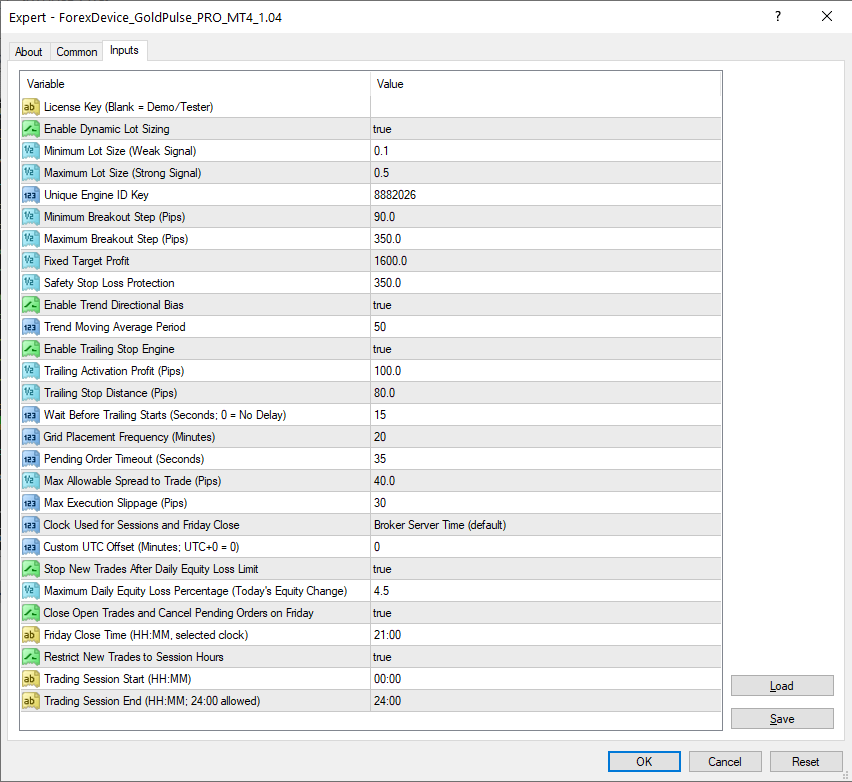
GoldPulse PRO v1.04 — actual MT4 input settings. Select the image to view it at full size.
| Input property (MT4 v1.04) | Default value | What this setting controls |
|---|---|---|
| License Key (Blank = Demo/Tester) | Blank | A valid license key is required only for live trading accounts. Demo accounts and Strategy Tester runs do not require a key. |
| Enable Dynamic Lot Sizing | true | Allows the EA to adjust trade volume within the configured minimum and maximum lot limits. |
| Minimum Lot Size (Weak Signal) | 0.1 | Sets the smallest trade volume the EA may select when dynamic sizing is enabled. |
| Maximum Lot Size (Strong Signal) | 0.5 | Sets the upper limit on trade volume when dynamic sizing is enabled. |
| Unique Engine ID Key | 8882026 | Identifies orders and positions belonging to this EA, helping separate them from other trading systems. |
| Minimum Breakout Step (Pips) | 90.0 | Sets the minimum distance used when calculating breakout pending-order entry levels. |
| Maximum Breakout Step (Pips) | 350.0 | Limits the maximum breakout entry distance when market volatility increases. |
| Fixed Target Profit | 1600.0 | Sets the take-profit target applied to an activated position, using the EA’s configured price-unit convention. |
| Safety Stop Loss Protection | 350.0 | Sets the initial protective stop-loss distance for an activated position. |
| Enable Trend Directional Bias | true | Enables the moving-average trend filter used when evaluating breakout direction and exposure. |
| Trend Moving Average Period | 50 | Sets the lookback period for the trend moving average; the default is 50. |
| Enable Trailing Stop Engine | true | Allows the EA to adjust an active position’s stop loss as price moves favorably. |
| Trailing Activation Profit (Pips) | 100.0 | Sets the favorable price movement required before trailing stop management becomes eligible. |
| Trailing Stop Distance (Pips) | 80.0 | Sets the trailing stop’s distance from price when the trailing conditions are met. |
| Wait Before Trailing Starts (Seconds; 0 = No Delay) | 15 | Introduces a 15-second waiting period before trailing can begin; a value of zero disables this delay. |
| Grid Placement Frequency (Minutes) | 20 | Sets the minimum interval between eligible breakout setup cycles. Despite the input name, this is not a martingale position grid. |
| Pending Order Timeout (Seconds) | 35 | Limits how long untriggered breakout pending orders remain active before they are removed. |
| Max Allowable Spread to Trade (Pips) | 40.0 | Prevents new breakout orders when the measured spread exceeds the configured threshold. |
| Max Execution Slippage (Pips) | 30 | Sets the maximum permitted execution-price deviation, subject to platform and broker handling. |
| Clock Used for Sessions and Friday Close | Broker Server Time (default) | Choose one of three clock modes: Broker Server Time (default), Computer or VPS Local Time, or Custom UTC Offset (minutes). The selected clock controls trading-session hours and Friday closing. |
| Custom UTC Offset (Minutes; UTC+0 = 0) | 0 | Sets the UTC offset in minutes only when Custom UTC Offset is selected as the clock mode. Broker Server Time and Computer or VPS Local Time ignore this value. |
| Stop New Trades After Daily Equity Loss Limit | true | Pauses new entries when the configured daily equity-loss limit is reached. It does not itself close existing positions. |
| Maximum Daily Equity Loss Percentage (Today’s Equity Change) | 4.5 | Sets the daily equity-loss threshold to 4.5%, measured according to the EA’s daily equity-change calculation. |
| Close Open Trades and Cancel Pending Orders on Friday | true | Enables the Friday procedure to close open EA trades and cancel its pending orders at the selected time, subject to execution conditions. |
| Friday Close Time (HH:MM, selected clock) | 21:00 | Schedules the Friday close procedure for 21:00 in the selected clock. |
| Restrict New Trades to Session Hours | true | Limits new breakout entries to the configured session window when enabled. |
| Trading Session Start (HH:MM) | 00:00 | Sets the beginning of the permitted trading session to midnight. |
| Trading Session End (HH:MM; 24:00 allowed) | 24:00 | Sets the end of the permitted trading session to 24:00, covering the full day with the 00:00 start. |
License & engine identity
Controls how the EA identifies its trades and manages licensing for live accounts.
A license key is required for live trading accounts only. Demo accounts and Strategy Tester runs can operate without entering a license key.
The EA’s unique identification number (Magic Number) that allows the trading engine to separate its positions and orders from other trading activity on the account.
Dynamic lot-sizing controls
Allows GoldPulse PRO to scale volume dynamically based on market volatility instead of using a rigid fixed lot size.
When active, the EA uses internal market volatility calculations to compute precise trade volumes within your defined boundaries.
Establishes the lower volume boundary applied during quieter market phases or weaker signal conditions.
Establishes the upper volume boundary for high-conviction market environments and stronger signals.
Breakout distance & directional bias
Establishes the boundaries for straddle breakout distances and filters trades using a moving average trend direction.
Defines the lower boundary for dynamic breakout placement. The straddle distance will not fall below this value.
Defines the upper boundary for breakout placement, preventing excessive distance during abnormal volatility.
Filters straddle orders against the configured moving average, adjusting counter-trend exposure automatically.
Sets the sensitivity length for the trend indicator used by the directional bias filter.
Target & safety stop loss
Defines initial profit objectives and protective stop-loss parameters for every activated breakout position.
Establishes the take-profit objective distance from the entry price upon order activation.
Establishes the initial protective stop-loss distance attached immediately when positions open.
Dynamic profit protection
Adjusts protective stops when configured activation conditions are met. Trailing stops do not guarantee profits.
Turns on dynamic trailing stop management to lock in favorable price movements automatically.
The profit threshold a trade must reach before the trailing mechanism becomes active.
The distance maintained between the market price and the dynamically trailing stop line.
Cycle frequency & spread thresholds
Controls breakout cycle intervals, pending-order expiration and allowable spreads.
The time interval between eligible trading cycle evaluations to deploy new breakout structures.
Lifespan of unexecuted pending breakout orders before they automatically expire and clear.
Prevents breakout deployment during periods of abnormally wide market spreads.
Sets the requested slippage tolerance; actual execution remains subject to broker conditions.
Daily protection & permitted trading times
Review these operational controls in your installed v1.04 Inputs tab before enabling live trading.
When the configured daily equity-loss threshold is reached, the EA pauses new entries and attempts to cancel its pending orders. This does not automatically close existing positions.
Controls when new trading setups are permitted. Confirm the selected days, time windows and time reference used by the EA.
Optional end-of-week closing control. Its operation depends on the configured setting, terminal connection and broker execution.
Review the activation threshold and any timing controls present in your installed build before changing trailing behavior.
How the parameters work together
GoldPulse PRO combines market filters, breakout settings, trading schedules and risk controls before placing new orders.
Cycle Evaluation
The EA checks the configured schedule, risk restrictions and eligible cycle timing before considering a new setup.
Trend & ATR Analysis
Moving averages and ATR measurements calculate precise lot sizing and breakout distances.
Straddle Deployment
Pending orders are placed with predefined stops, targets, and short expiration timeouts.
Active Management
Open positions remain subject to stop loss, take profit and any enabled trailing rules.
Parameter customization guide
Review these guidelines before altering default settings to ensure proper strategy alignment.
Adjusting Lot Sizing Boundaries
Modifying minimum and maximum lot sizes directly impacts capital exposure. Ensure adjustments align with your account equity, margin requirements, and broker specifications.
Tuning Breakout Steps
The breakout range boundaries dictate how far pending straddles are placed from current prices based on volatility.
Configuring Trend Bias Filters
Enabling the moving average trend filter helps balance counter-trend trades by scaling lot volumes appropriately in trending markets.
Managing Timeouts & Spreads
Short expiration timers limit stale pending orders, while spread limits can restrict new entries during wide-spread conditions.
Configure with clarity. Trade with precision.
Use the v1.04 documented settings and explanations, then confirm the inputs in your installed EA. For installation and activation steps, visit the separate Setup Guide.
VIEW SETUP GUIDE →